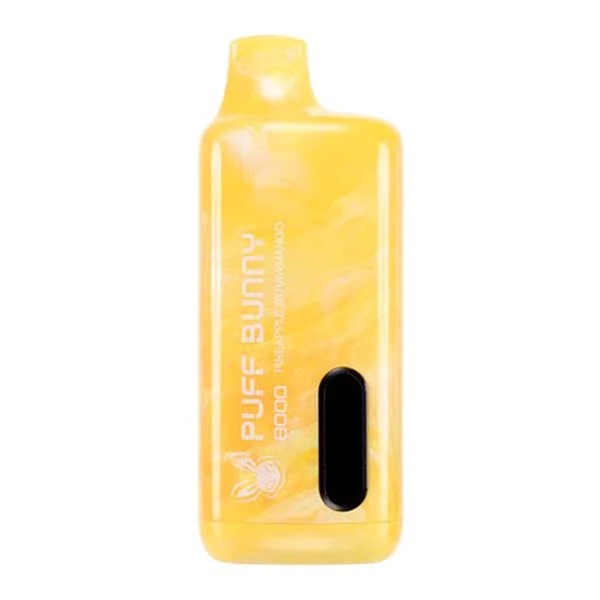

Why Is Your Puff Bunny 8000 Blinking While Charging?
Seeing your Puff Bunny 8000 blinking while charging can be confusing, especially if the device otherwise seems to work fine. For many users, blinking lights raise concerns about battery health, charging safety, or whether the vape is nearing the end of its lifespan. In reality, blinking indicators are a built-in communication system designed to tell you what is happening inside the device. Understanding these signals helps you charge safely, avoid damage, and get the most consistent performance from your disposable vape.
This article breaks down the common reasons behind charging-related blinking, explains what each behavior usually means, and clarifies when blinking is normal versus when it signals a problem. Everything is explained in clear, easy-to-follow language so even first-time users can confidently troubleshoot their Puff Bunny 8000.
How the Puff Bunny 8000 Charging Indicator Works
The Puff Bunny 8000 uses an LED indicator to communicate battery and charging status. Since disposable vapes lack screens or detailed interfaces, manufacturers rely on blinking patterns to signal charging progress, battery protection modes, or internal faults. When you plug in the device, the internal chip monitors voltage, temperature, and current flow, and the LED responds accordingly.
In most cases, blinking during charging is normal. It often means the battery is actively charging, balancing voltage, or protecting itself from overheating. Unlike older vape devices that show a steady light while charging, many newer disposables intentionally blink to indicate controlled power intake. This helps prevent battery stress and improves safety, particularly in compact, high-capacity devices like the Puff Bunny 8000.
Normal Reasons Your Puff Bunny 8000 Blinks While Charging
One of the most common reasons for blinking is that the battery is in an active charging cycle. The blinking light usually means the device is receiving power and gradually increasing its charge level. As the battery fills, the blinking pattern may slow down or change, signaling that charging is nearing completion.
Another normal cause is voltage regulation. Disposable vapes use lithium-ion batteries that must be charged within a narrow voltage range. When the Puff Bunny 8000 detects fluctuations from the power source, it may blink to indicate that it is regulating input to protect the battery. This is especially common when charging from laptops, power banks, or car chargers, where power delivery can vary.
Blinking can also occur when the device is warm. If you recently used the vape heavily before plugging it in, the internal temperature may be slightly elevated. The blinking light may indicate that charging is happening at a reduced rate until the device cools down, which is a normal safety response.
Blinking as a Battery Protection Feature
The Puff Bunny 8000 is designed with basic battery protection circuits to reduce the risk of overheating, overcharging, or short-circuiting. When the device detects a condition that could stress the battery, blinking acts as a warning and a control mechanism at the same time.
For example, if the battery is very low, the device may blink rapidly at first to indicate deep discharge recovery. During this phase, charging happens slowly to stabilize the battery. Similarly, if the charger is delivering slightly higher current than ideal, the vape may blink to show it is limiting intake rather than accepting full power.
These protections are particularly important in disposable devices, where the battery is sealed and not user-serviceable. Blinking during charging often means the Puff Bunny 8000 is doing exactly what it is supposed to do to keep the battery stable and safe.
When Blinking Signals a Potential Problem
While blinking is often normal, certain patterns can indicate an issue. Continuous rapid blinking that does not slow down after several minutes of charging may suggest a poor connection between the cable and the charging port. Dust, lint, or e-liquid residue inside the port can interrupt power flow and cause the device to repeatedly start and stop charging.
Another potential issue is charger incompatibility. Using high-wattage adapters or fast chargers can confuse the charging circuit, leading to persistent blinking without progress. In some cases, the battery may be nearing the end of its usable life, especially if the device has already delivered most of its rated puffs. As disposable vape batteries degrade, they may struggle to hold a stable charge, triggering repeated blinking.
If blinking is accompanied by performance changes, such as weak vapor, inconsistent firing, or users asking why does it taste burnt, this may point to a battery that can no longer deliver steady power to the coil. In these cases, charging alone may not resolve the issue.
Charging Habits That Affect Blinking Behavior
How you charge your Puff Bunny 8000 plays a significant role in blinking behavior. Charging immediately after long vaping sessions increases internal heat, which can trigger temperature-based blinking. Allowing the device to rest for 10 to 15 minutes before plugging it in often results in smoother, more consistent charging.
Using low-power charging sources also matters. Charging from a computer USB port or a low-output wall adapter generally produces fewer blinking irregularities than fast chargers designed for smartphones. Additionally, charging in a cool, dry environment helps the battery maintain stable conditions, reducing unnecessary blinking.
Frequent unplugging and replugging can also confuse the charging indicator. If you notice blinking, it is best to leave the device connected for at least 20 to 30 minutes before checking progress, unless the device becomes hot or shows signs of malfunction.
How to Tell When Charging Is Complete
In most Puff Bunny 8000 units, blinking will stop or change to a solid light once charging is complete. Some models turn the light off entirely, indicating that the battery has reached its safe maximum charge. If the device remains plugged in after completion, the protection circuit prevents overcharging by cutting off power intake.
If your device continues blinking indefinitely without ever stabilizing, this may indicate battery degradation rather than a charging issue. Since the Puff Bunny 8000 is disposable, persistent charging problems often mean the device is approaching the end of its lifecycle.
Safety Tips While Charging a Blinking Puff Bunny 8000
It is important to monitor the device while charging, especially if blinking appears unusual. Always charge on a flat, non-flammable surface and avoid charging overnight or unattended. If the device becomes excessively warm, unplug it immediately and allow it to cool.
Avoid attempting to open, modify, or repair the device. Disposable vapes are not designed for internal servicing, and tampering can increase the risk of battery failure. If blinking is accompanied by swelling, leaking, or a strong chemical smell, discontinue use and dispose of the device responsibly.
Conclusion
A blinking Puff Bunny 8000 while charging is usually a normal and intentional behavior, designed to communicate charging status and protect the battery. In most cases, it indicates active charging, voltage regulation, or temperature control, all of which help extend the device’s safe usability. However, persistent or unusual blinking can signal issues such as poor charging connections, incompatible power sources, or battery wear.
By understanding what blinking means, adopting proper charging habits, and recognizing warning signs early, users can avoid unnecessary concerns and ensure a safer vaping experience. When blinking is paired with declining performance or charging instability, it may be a clear sign that the device has reached the end of its intended lifespan and should be replaced rather than forced back into use.