Daily Habits That Extend Lost Mary MO20000 Pro Lifespan
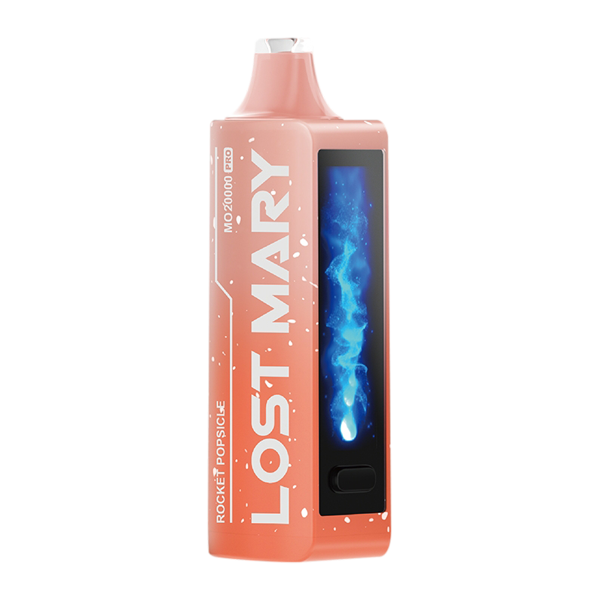
The Lost Mary MO20000 Pro combines high-capacity output with compact convenience, but daily habits determine how long it sustains peak performance. This guide explains practical, evidence-based routines for charging, storage, cleaning, and usage that preserve battery health, prevent premature wear, and keep the device functioning reliably. Each section explains why a habit matters and how to apply it so you can make small changes that produce measurable long-term benefits.
Understanding the MO20000 Pro’s power system
The MO20000 Pro uses lithium-based cells and integrated power management to balance capacity with safety. These batteries perform best when kept within moderate state-of-charge windows and managed to avoid thermal stress. The device’s internal circuitry provides protections against overcurrent and overvoltage, yet it cannot stop gradual chemical aging caused by repeated exposure to extremes. Recognizing the battery as the device’s most vulnerable component helps frame daily choices: charging patterns, ambient temperature during use, and storage state will cumulatively determine cycle life and retained capacity.
Optimized charging routines for daily use
Adopt a charging routine that avoids both deep discharges and prolonged periods at full charge. Bringing the battery up from a low level to a mid-to-high state—rather than running it to zero or always topping to one hundred percent—reduces the time the cells spend at peak voltage, which is when they age faster. Short, frequent charges during downtimes maintain usable capacity without forcing full cycle counts. When possible, charge during periods of inactivity rather than overnight for extended stretches. These modest adjustments lower chemical stress on the cells and translate into more usable cycles over the device’s lifetime.
Choosing the right charger and cable
Use a quality USB-C cable and a charger with stable output and protection features. Chargers designed for small electronics or smartphones typically supply an appropriate current and include overcurrent, overvoltage, and thermal cutoffs. Avoid cheap, unregulated adapters that can produce voltage spikes, inconsistent current, or excess heat. While the device’s internal circuit will clamp unsafe inputs, an appropriate external charger reduces thermal load during charging and helps maintain a consistent charging curve that’s kinder to the battery over repeated sessions.
Temperature control during charging and use
Heat accelerates aging for lithium-based batteries far more than minor differences in charge level. Charging and heavy use that raise internal temperatures will shorten overall lifespan. Place the device on a hard, cool surface while charging, and avoid direct sunlight or enclosed, warm spaces. If you’ve used the device heavily and it feels warm, let it cool before connecting it to power. Cold environments can temporarily reduce available capacity and cause inefficient charging, so aim for moderate ambient conditions for both storage and regular use to preserve long-term health.
Daily cleaning and maintenance habits
A regular cleaning routine prevents grime from compromising mechanical parts and airflow, which in turn maintains consistent performance. Clear debris from the mouthpiece and airway gently, and inspect seals and connections for wear. Keep the charging port free of lint and contaminants to ensure reliable contact and reduce resistance that could generate heat. Replace worn consumables and damaged cables promptly; small faults left unattended often escalate into issues that affect battery load and device reliability.
Usage patterns that reduce wear
How you use the MO20000 Pro affects battery stress and component longevity. Avoid repetitive cycles of full discharge and immediate full charge; instead, intersperse topping charges during gaps in use. Vary session intensity where possible to prevent continuous high-current draws that raise internal temperatures. If you carry the device in pockets or bags, ensure it’s protected from compressive forces and abrasive contact that could damage the casing or connectors. Thoughtful, moderate usage extends the practical life of both the battery and the device’s mechanical parts.
Monitoring and troubleshooting performance changes
Track runtime and charging frequency as simple indicators of battery health. A gradual decline over months is expected, but sudden shifts, such as abruptly reduced runtime or inconsistent power delivery, warrant closer inspection. Check for firmware updates and manufacturer diagnostics if available; software adjustments sometimes refine charging profiles or thermal behavior. Before concluding that hardware replacement is necessary, confirm that charging habits and environmental factors aren’t accelerating wear. Addressing these root causes often restores predictable performance.
Addressing sound and flavor issues as clues
Non-electrical symptoms often hint at maintenance needs. Loose components, airflow obstructions, or degraded consumables can alter experience and indicate mechanical wear that indirectly stresses the power system. If you notice physical noises during operation, ask if are rattling sounds normal in your vape? Such inspection-oriented questions help identify loose baffles, shifted internals, or degraded seals early. Similarly, muted or inconsistent flavor can stem from uneven heating tied to poor contact or low battery states, so treat sensory changes as diagnostic signals rather than isolated annoyances.
Storage best practices for long gaps between use
When storing the MO20000 Pro for extended periods, leave the battery at a partial state of charge rather than full or empty. Storing at roughly mid-level reduces voltage stress and minimizes the risk of self-discharge bringing the battery to damaging low voltages. Keep the device in a cool, dry place away from direct heat sources. Check stored devices periodically and top up to the recommended storage level as needed. These steps reduce the likelihood of irreversible capacity loss during idle months and keep the device ready for reliable service when you return to use.
Safety checks and replacement timing
Regular visual and tactile inspections help detect early signs of failure. Look for case swelling, unusual warmth, distorted ports, or odors during charging; any of these signs require immediate cessation of use and consultation with support or a qualified technician. When run time becomes inconvenient despite optimized charging and storage, battery replacement or device renewal may be the practical step. Make that decision based on measured decline and safety indicators, not just convenience, and prioritize repairs from trusted service channels.
Conclusion
Daily habits that target charging behavior, temperature control, careful use, and routine maintenance will preserve the MO20000 Pro’s functional life and safety far more effectively than occasional heavy-handed fixes. Treat the battery as a component that thrives under moderate states of charge and cool, consistent environments. Couple that mindset with quality chargers, periodic inspections, and sensible storage, and you create an ecosystem of care that keeps the device dependable while minimizing the likelihood of premature failure. Would you like a condensed, printable summary of these practices formatted for quick reference?